How to Install Custom Tracks in Assetto Corsa
Updated October 3, 2026
Short answer: install Content Manager, then drag the track's .zip, .rar or .7z onto its window and click Install. To do it by hand, extract the archive and copy the track's folder into steamapps\common\assettocorsa\content\tracks. The track's ui and data folders must sit directly inside its own folder. If a track doesn't show up, it's almost always nested one folder too deep.
What you need
- Assetto Corsa on PC (Steam). Consoles don't support mods, and Assetto Corsa Competizione doesn't load custom tracks.
- Content Manager, the free launcher nearly everyone uses for mods. It installs tracks, lists them with previews and downloads missing content for online servers.
- Custom Shaders Patch (CSP), recommended. Many newer tracks use its lighting, grass and extra features. Content Manager installs and updates it under Settings › Custom Shaders Patch.
- A track to install. Download one from a mod site, the Drift Maps track library, or build your own from a real road.
Method 1: drag and drop into Content Manager
- Download the track. Leave it zipped.
- Open Content Manager.
- Drag the archive anywhere onto the Content Manager window.
- Content Manager reads it and shows what's inside. Click Install.
- Go to Drive, pick the track, and you're done.
This is the safest way, because Content Manager puts the folder in the right place, so nothing ends up nested wrong.
Method 2: one-click install links
Some sites give you an Install in Content Manager button. It opens Content Manager, which downloads and installs the track by itself, with no zip to handle. Every Drift Maps track has one, in the delivery email and in Your builds.
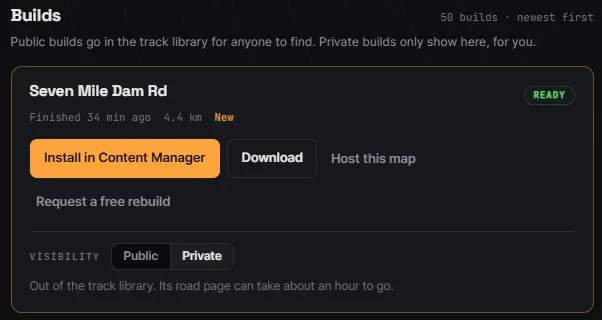
If the button does nothing, Content Manager isn't registered to open links yet. Open Content Manager once, then try again.
Method 3: install a track manually
- Find the game folder. In Steam, right-click Assetto Corsa › Manage › Browse local files. The default is
C:\Program Files (x86)\Steam\steamapps\common\assettocorsa. - Extract the download with 7-Zip or WinRAR.
- Find the real track folder inside: the one that contains
ui,dataand one or more.kn5files. - Copy that folder into
assettocorsa\content\tracks. - Restart Content Manager, or press F5 on the track list, and pick the track.
The folder should look like this:
✓ right
assettocorsa\content\tracks\seven_mile_dam_rd\
    ui\
    data\
    seven_mile_dam_rd.kn5

✗ wrong (one folder too deep)
assettocorsa\content\tracks\seven_mile_dam_rd\seven_mile_dam_rd\
    ui\
    data\
Tracks with several layouts have a subfolder per layout inside ui (and usually a matching one at the top level). That's normal. Leave them as they came.
Track not showing up? Fixes that work
1. The folder is nested too deep
By far the most common cause. Archives often wrap the track in an extra folder with the same name. Open content\tracks\yourtrack: if you see another folder instead of ui and data, move that inner folder up one level.
2. It went into Documents instead of the game folder
Documents\Assetto Corsa holds settings, replays and logs, not tracks. Tracks go in the Steam install folder. A copy left in Documents\Assetto Corsa\tracks can also make the track fail to load, so delete it.
3. The archive didn't extract fully
A failed or partial extract leaves out the .kn5 or ui_track.json. Download it again and extract with 7-Zip.
4. Content Manager hasn't refreshed
Content Manager caches the track list. Press F5 on the list or restart it. Use the filter box to search by name. The name shown comes from the track's ui_track.json, not the folder name.
5. It loads but looks broken or crashes
Black textures, missing grass or a crash on load usually means the track needs Custom Shaders Patch or a newer version of it. Update CSP in Content Manager and try again.
Fixing "track not found"
"Track not found" means the game was asked to load a track or layout that isn't where it expects:
- Offline: the folder is nested, renamed or incomplete. Fix it with the steps above. Don't rename track folders: the game looks them up by folder name.
- Joining a server: you don't have the track, or you have a different version. In Content Manager's online tab, use the button to install the missing content, or download the exact version the server lists.
How to remove a custom track
In Content Manager, open the track under Content › Tracks and delete it from there. Or delete its folder from content\tracks. Nothing else in the game is touched.
Where to get tracks
- Mod sites like OverTake (formerly RaceDepartment) have thousands of free circuits and drift tracks.
- The Drift Maps road directory: real roads other drivers have built, from touge and canyon roads to local backroads. A free account downloads 2 a week.
- Your own road: drop two pins on any real road and get it built as a track that installs in one click. See how to make an Assetto Corsa track from a real road.
FAQ
How do I install custom maps in Assetto Corsa?
Maps and tracks are the same thing in Assetto Corsa. Drag the download onto Content Manager and click Install, or copy the track folder into content\tracks.
Do I need Content Manager to install tracks?
No, the manual method works with the stock launcher. Content Manager makes it faster, shows previews and catches folder mistakes for you.
Can you install custom tracks on PS5 or Xbox?
No. Custom tracks only work in Assetto Corsa on PC.
Do custom tracks work in Assetto Corsa Competizione?
No. ACC doesn't load custom tracks. They're for the original Assetto Corsa.
Can I use custom tracks online?
Yes. Everyone on the server needs the same track installed. Content Manager can download it when you join. Plus comes with a private server that hosts your own Drift Maps track for you and 3 friends.